
User guide
Latialma is a free-to-join dating site that connects people in Latin America and the Caribbean with people from around the world. It's for adults 18 and over, and it works in any phone or computer browser.
The site is available in Spanish, English, Portuguese, French and Haitian Creole. Each section below walks through one part of the site with screenshots taken on a phone, and the FAQ answers the questions members ask most.
Getting started
Creating an account takes about two minutes: your email or phone, a password, your date of birth, and a 6-digit code.
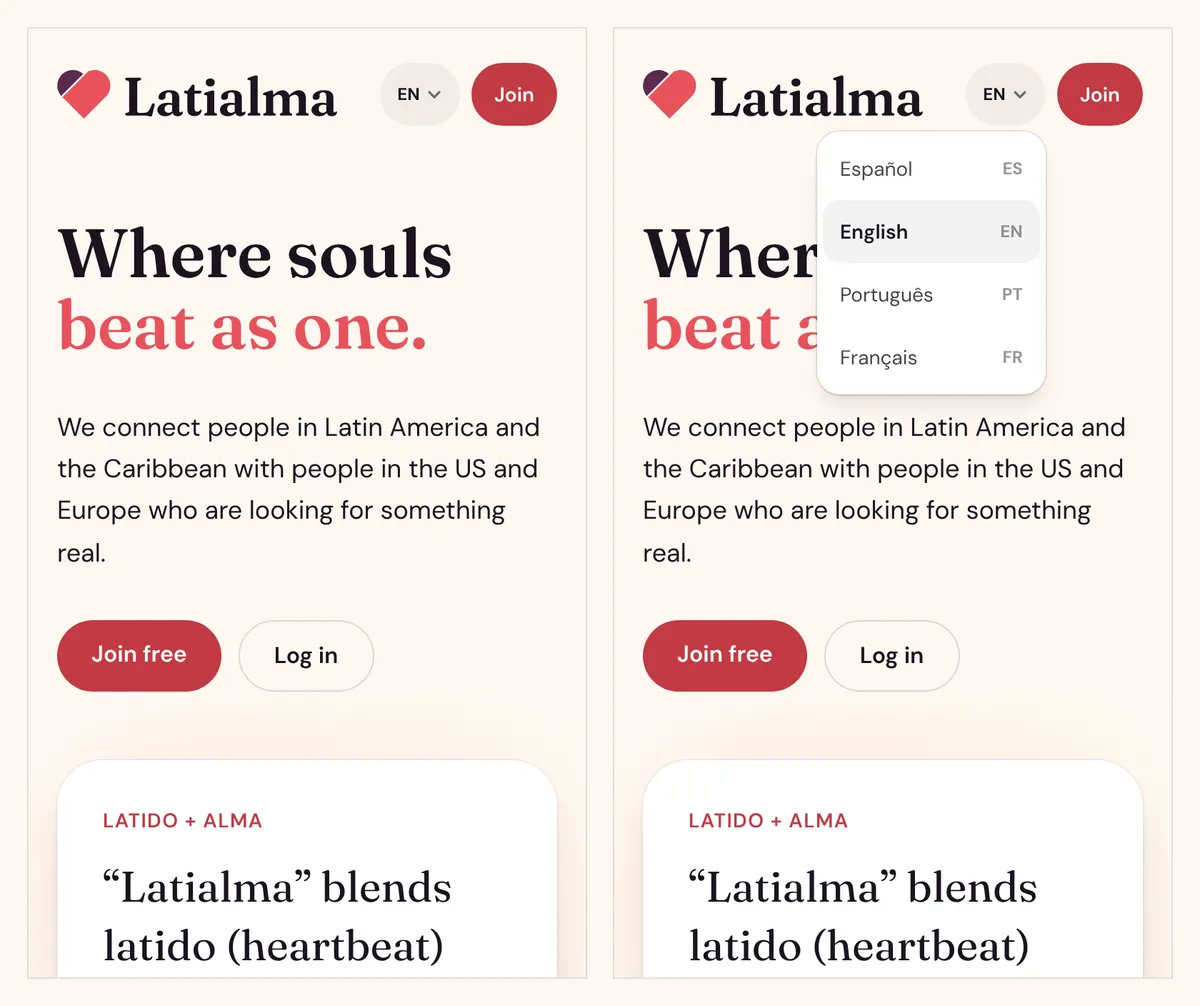
Choose your language
Tap the language button at the top of any page (it shows EN, ES, PT, FR or HT) and pick Español, English, Português, Français or Kreyòl ayisyen. On a tablet or computer the five languages show side by side. Latialma remembers your choice, and your emails arrive in the same language.
Create your account
- On the homepage, tap Join free.
- Enter your email or phone number. For a phone, include the country code (for example +1 809 555 1234), and we text your code by SMS to that number.
- Choose a password of at least 8 characters.
- Pick your date of birth. You must be 18 or older. Your age and zodiac sign are shown on your profile, and the date can't be changed later.
- Tick I accept the terms and the privacy policy, then tap Create account.
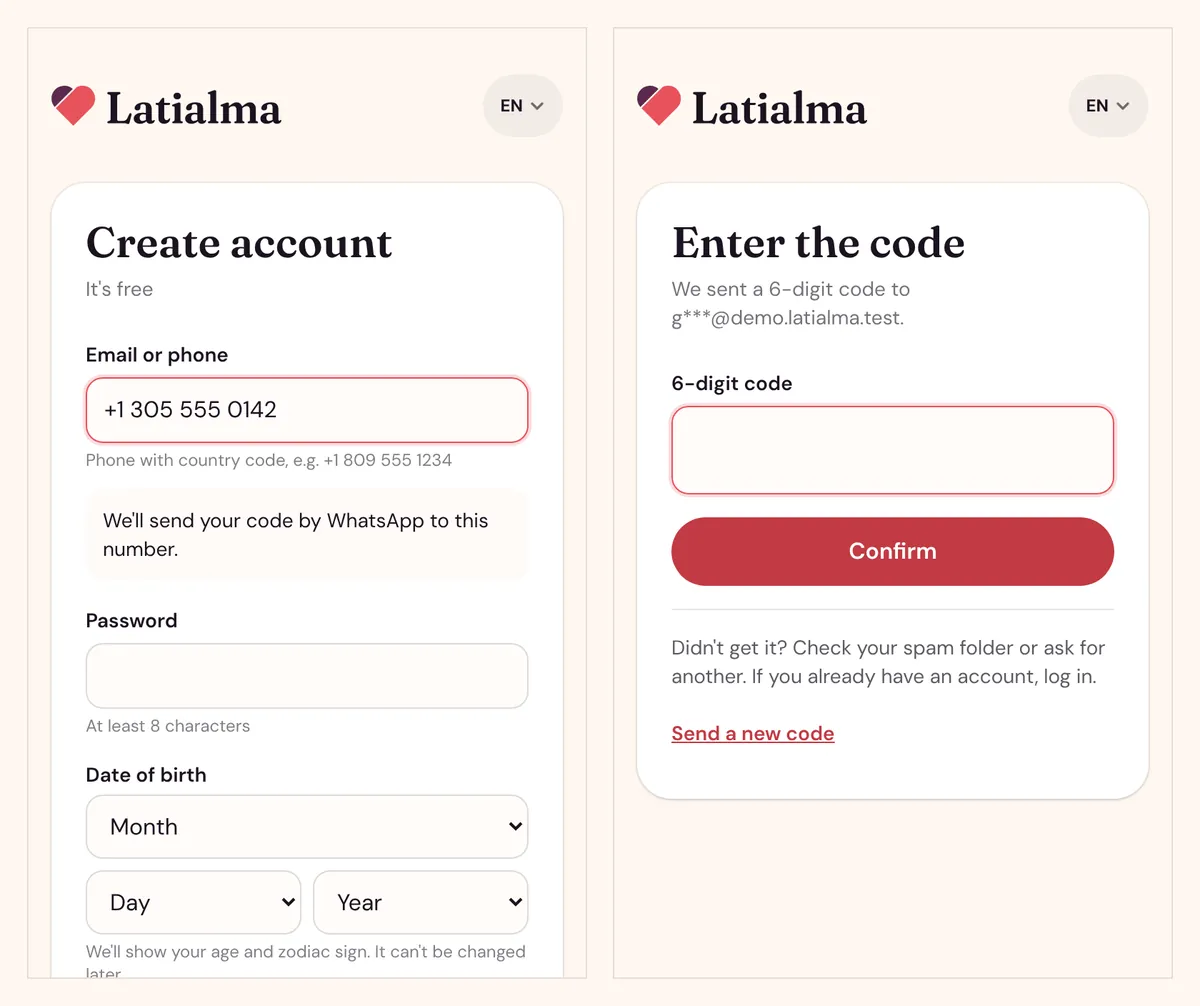
Confirm with your code
We send a 6-digit code to your email or phone. Type it in and tap Confirm, and you're in.
- The code works for 15 minutes.
- After 5 wrong tries, ask for a new code.
- Tap Send a new code if it doesn't arrive (up to 5 codes an hour). Check your spam folder first.
Log in and reset your password
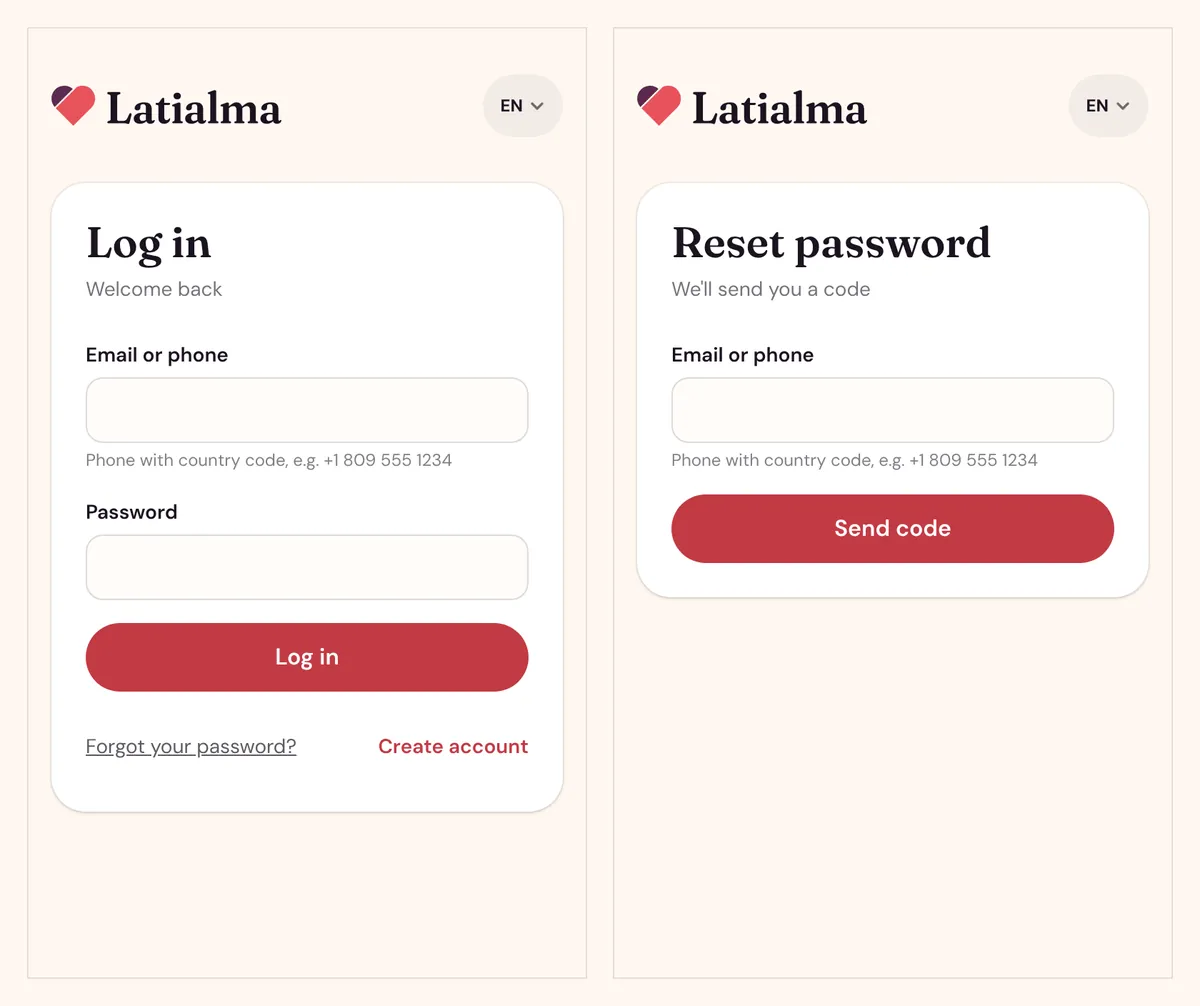
Tap Log in, enter your email or phone and password. To reset a forgotten password, tap Forgot your password?, enter your email or phone, type the code we send, and choose a new password. Changing your password signs you out on your other devices.
Sign in with Google, Facebook or TikTok
On the Log in and Join free pages you can use Continue with Google, Continue with Facebook or Continue with TikTok. Tap one to use that account instead of a password.
- The first time, you still pick your date of birth and accept the terms once, then you go straight to your profile.
- If you already have a Latialma account with the same email, it connects automatically, and your password keeps working.
- TikTok never shares an email, and some Facebook accounts only have a phone. In that case we ask for your email or phone number once and send you a code to confirm it.
Have an invitation or promo code?
If a friend invited you, open their invitation link, or type their code under Have a code? on the sign-up page (or within 30 days, on the Premium page). Once you verify your identity, you count toward their free Premium.
If someone gave you a Latialma card, scan its QR code: sign-up opens with the code already filled in. A card code gives you free Premium for life, and you can earn money by inviting others (see Invite friends).
Your profile
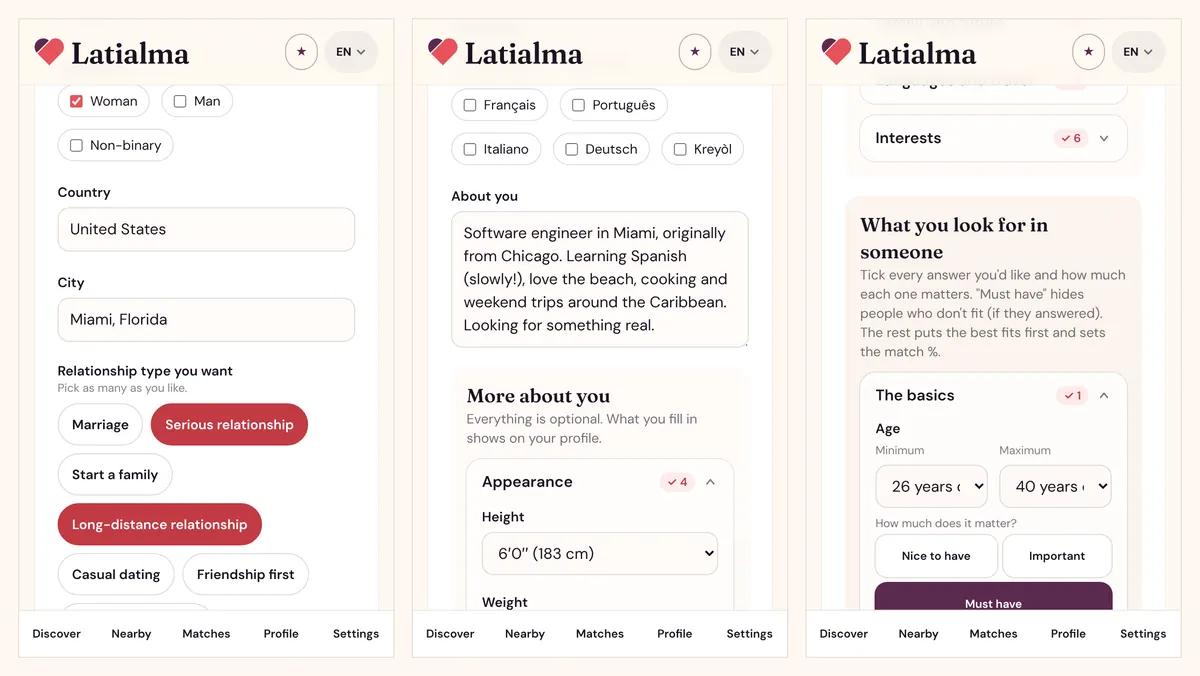
After you confirm your code, Latialma asks you to create your profile. Only name, gender, who you're looking for and country are required; everything else is optional but helps the right people find you. Edit it any time from Profile in the menu at the bottom of the screen.
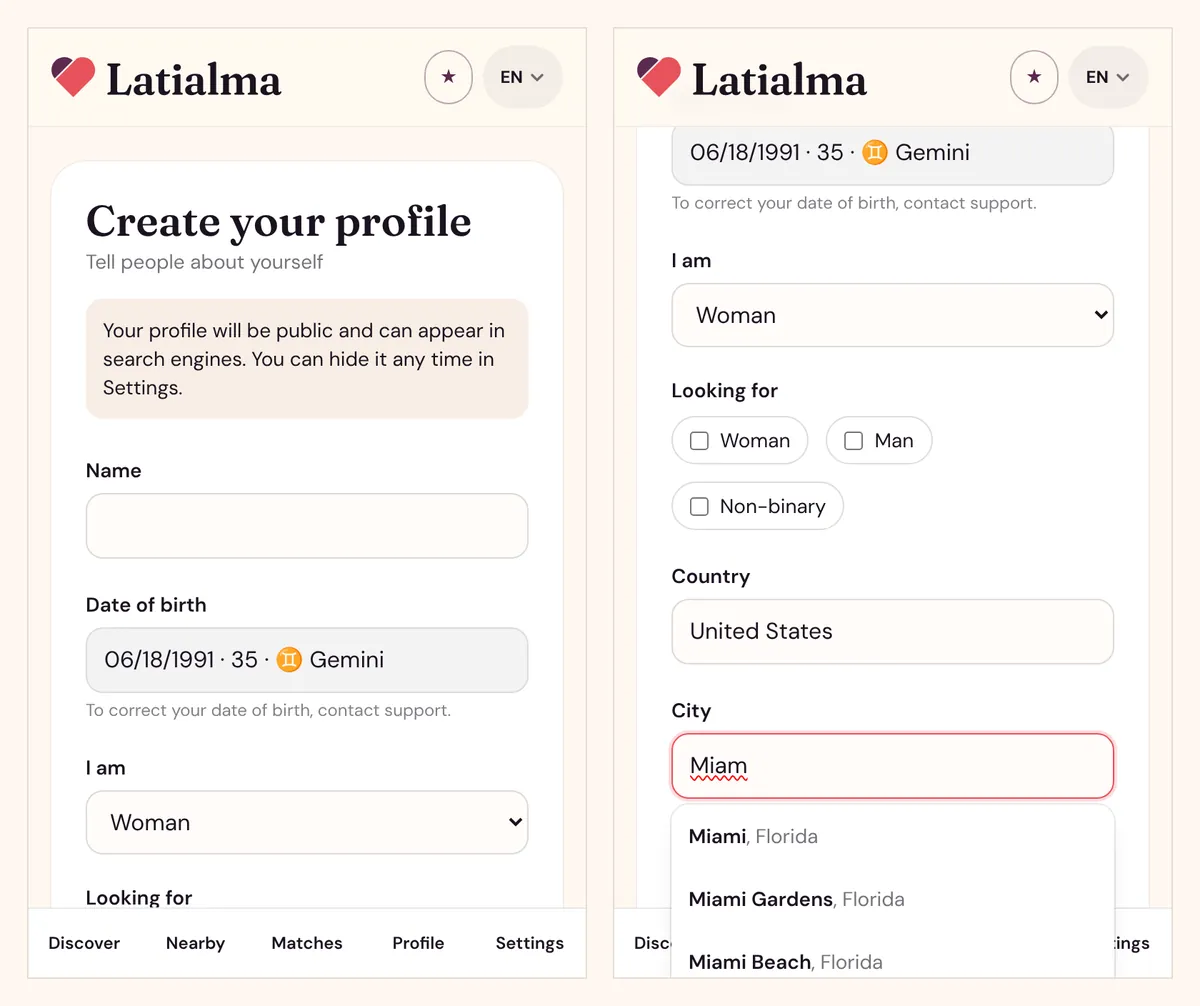
The basics
- Name: up to 40 characters.
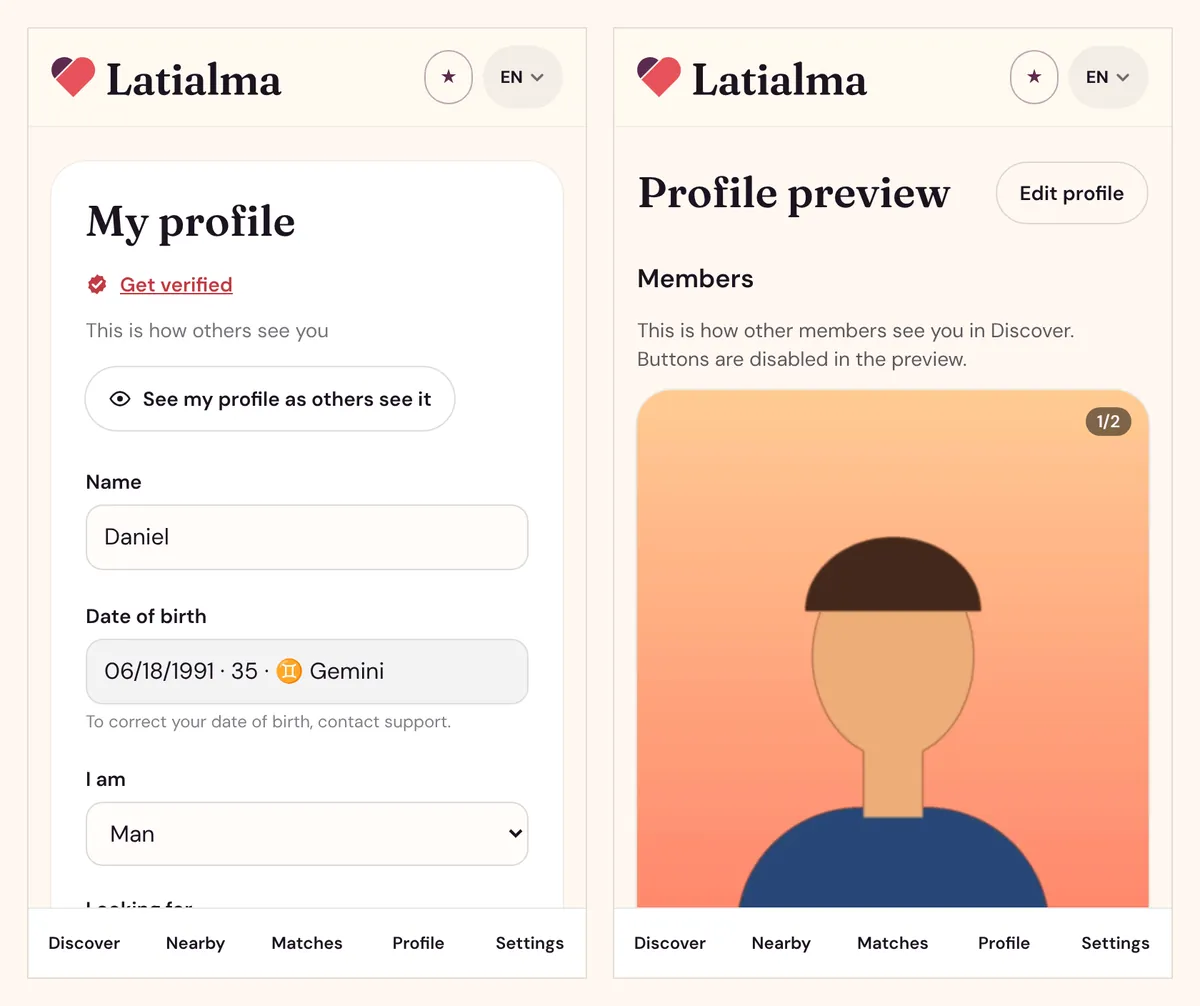
- Date of birth: shown with your age and zodiac sign. To correct it, contact support.
- I am (Woman, Man or Non-binary) and Looking for (tick one or more).
- Country and City: start typing your city and pick it from the list. Other members see your city and an approximate distance, never your exact location.
- Relationship type you want: pick as many as you like, from Marriage and Serious relationship to Language exchange or Travel companion.
- Languages you speak, and About you (up to 1,000 characters).
- Write in your own language: your About you and job are translated automatically into Spanish, English, Portuguese, French and Haitian Creole for people who speak another language. You can write in any language: we detect it, or pick yours under Language you write in.
More about you, and what you look for
More about you covers appearance (height, weight, body type, eyes, hair, tattoos), background and beliefs (ethnicity, nationality, religion), lifestyle (education, job, smoking, drinking, drugs…), family (marital status, how many children and whether they live with you, whether you want more) and languages. Tap a section to open it. Anything you leave empty shows as "Prefer not to say".
What you look for in someone has a question for every detail: tick every answer you'd like (for example green or blue eyes) and choose how much it matters:
- Nice to have: counts a little.
- Important: counts a lot.
- Must have: hides people who answered something else. People who left that detail empty still show.
This sets the match % on every profile. It counts what you look for and what the other person looks for, so it's the same number for both of you. Anything you don't tick counts as "Doesn't matter".
Tap Start (first time) or Save when you're done.
Likes and dislikes, your ideal type, and what you're open to
All optional, and only what you fill in shows on your profile.
- My ideal type and Looking for / open to: two short texts (up to 500 characters each), translated automatically like About you.
- Likes and dislikes: for Music, Movies, TV shows, Books, Places, Activities, Sports & teams, Games, Food, Drinks, Pets, Podcasts and Love language, add up to 10 things you like and 10 you don't. Tap a topic, choose ♥ I like or ✕ I don't like, then pick a suggestion or type your own and tap Add. Tap an item to remove it.
- In What you look for, you can pick several answers for every topic, or tap ✓ All OK to tick them all at once.
Photos and videos
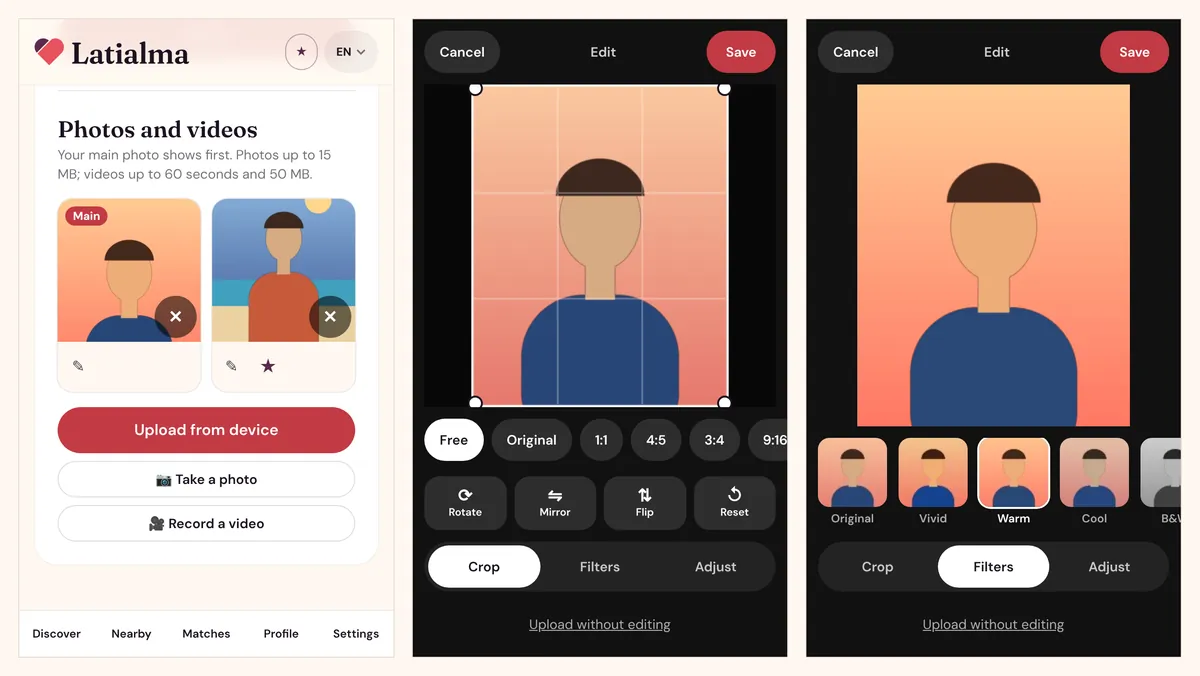
Your main photo is the first thing people see. Add as many photos and videos as you like:
- Upload from device (you can pick several at once), Take a photo or Record a video with your phone's camera.
- Photos up to 15 MB. Videos up to 60 seconds and 50 MB; they show "Processing…" for a moment after upload.
- Before each upload you can crop, rotate, add a filter or adjust brightness, or tap Upload without editing. For videos you can also trim, mute the sound and choose the cover frame.
- Under each photo: ✎ edits it again, ★ makes it your main photo, ‹ › moves it, and × deletes it.
Location data is removed from every photo and video you upload.
See your profile as others see it
On your profile page, tap See my profile as others see it. The preview shows your card exactly as members see it in Discover, and Open as a visitor shows your public page as someone without an account sees it.
Discover, likes and matches
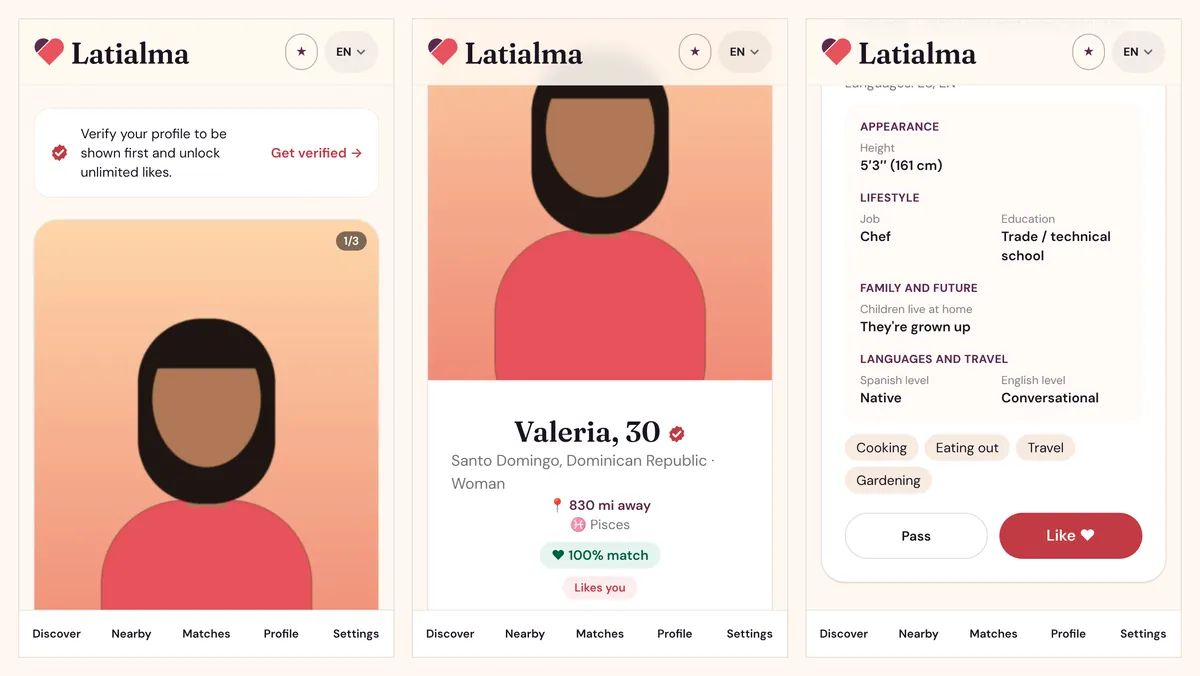
Discover shows one person at a time. Tap Like ♥ if you're interested or Pass to move on; when you both like each other, it's a match and you can start chatting.
How Discover works
- Swipe through the photos and scroll down for the full profile: bio, languages, details and interests.
- A Likes you label means that person already liked you. People who liked you are shown first, then the people who best fit your preferences.
- You only see people who fit your preferences, and who are looking for someone like you, within each other's must-haves and distance. The best matches come first.
- Each person appears once. After you like or pass, they don't come back, so take a moment before you decide.
- Members who haven't verified their identity can send 30 likes every 24 hours. Verified members have no limit.
If someone wrote their profile in another language, you'll see it translated into yours, marked Automatically translated from …. Tap See original to read their own words.
When the like is mutual you'll see It's a match! Tap Send a message to say hello. Verified members also get a Verified profiles only filter at the top of Discover.
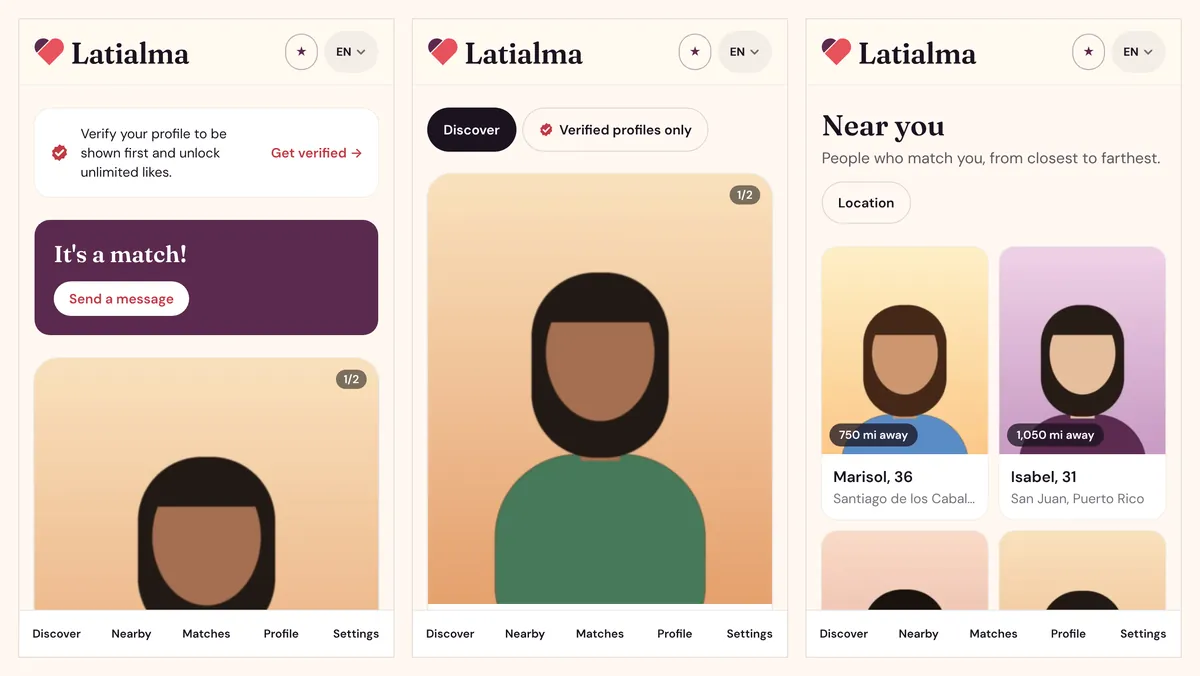
Nearby
Nearby lists the same people as Discover, sorted from closest to farthest, with an approximate distance on each photo. Tap someone to open their profile in Discover. Tap Location to change your distance or places.
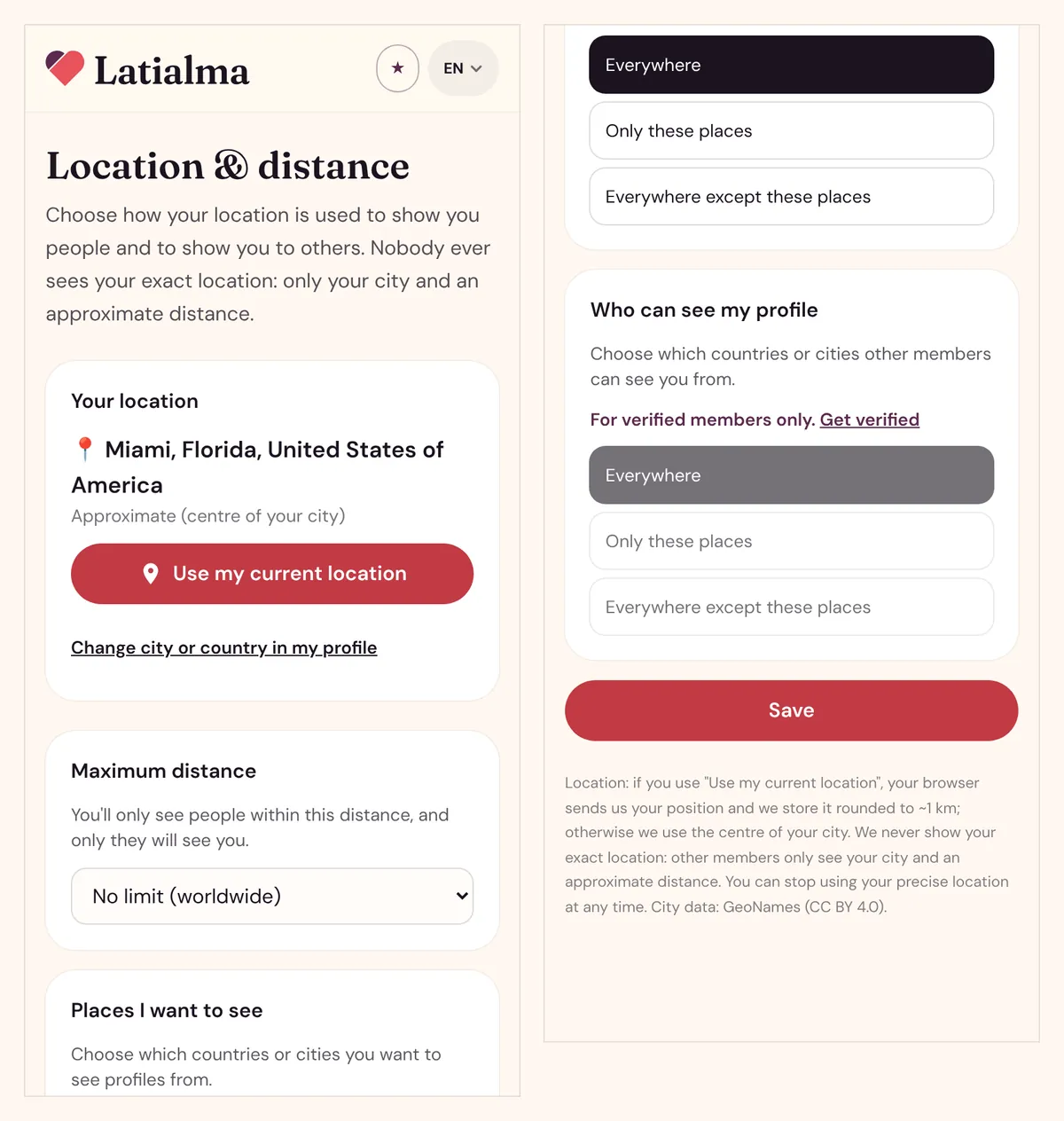
Location and distance
Open Location from Nearby or from Settings to control where you look and who sees you:
- Your location: by default, the centre of your city. Tap Use my current location for more accurate distances (rounded to about 1 km), or Stop using my precise location to go back.
- Maximum distance: from 10 km up to 5,000 km, or no limit. You only see people within this distance, and only they see you.
- Places I want to see: everywhere, only certain countries or cities, or everywhere except some.
- Who can see my profile: the same choices for who sees you (verified members only).
Tap Save when you're done. Nobody ever sees your exact location.
Messages
You can message anyone you've matched with. Open Matches to see all your matches, each with the last message (or Say hi! for a new match) and a red badge counting unread messages.
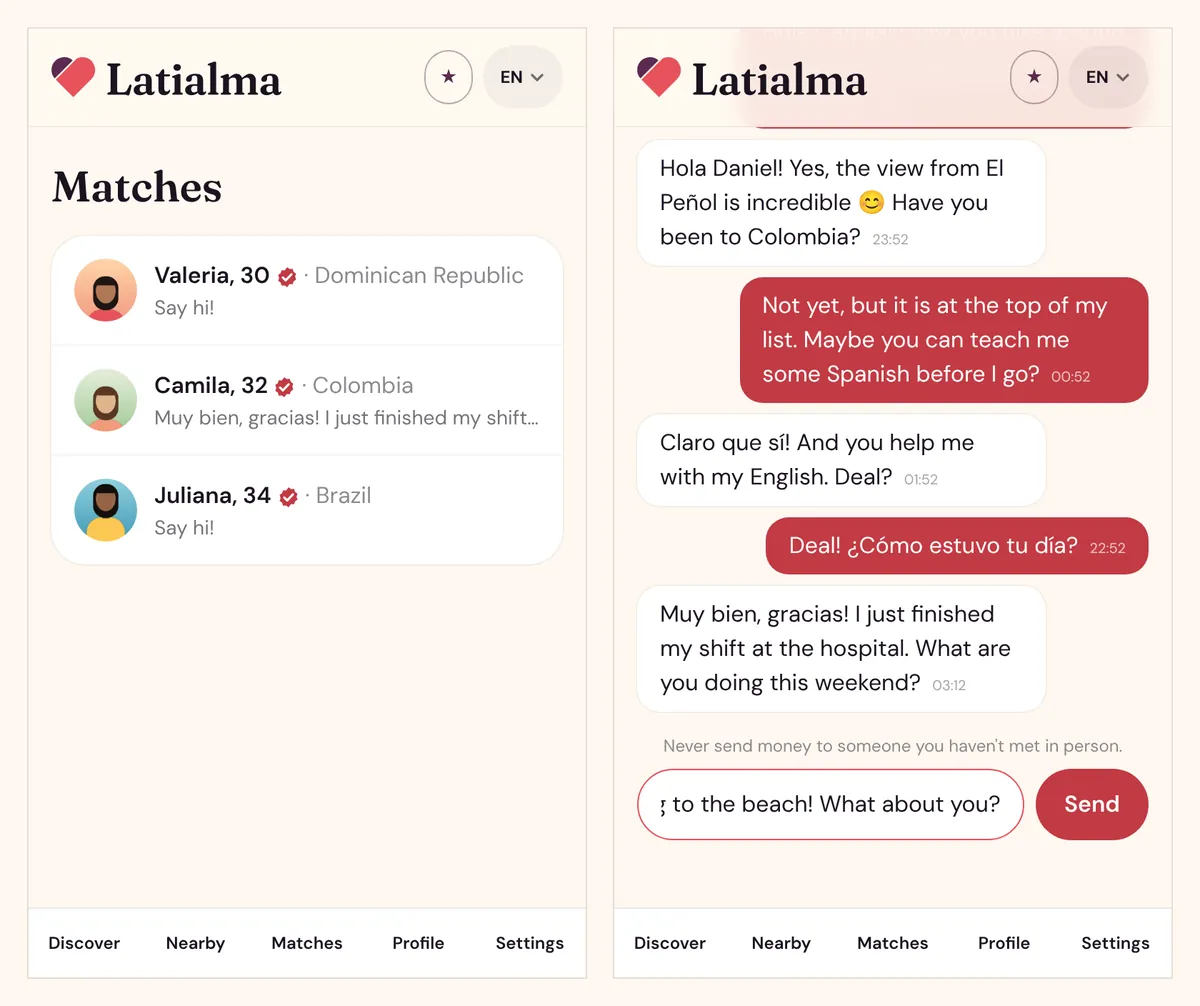
Chatting
- Tap a match to open the conversation, type in Write a message… and tap Send. Messages can be up to 2,000 characters; you can also send photos and videos (see below).
- New messages appear on their own while the chat is open.
- Tap the name at the top (View profile) to see their full profile.
- Members who haven't verified their identity can start 5 new conversations every 24 hours. Replying in existing chats has no limit, and verified members have no limit at all.
Photos and videos in chat
Tap the 📎 button next to the message box to send a photo or video (up to 60 seconds) from your gallery or camera. You see a preview and can add a message before tapping Send.
- Only members with the ✓ Verified badge can send photos and videos. Anyone can receive them.
- Photos and videos someone sends you stay blurred until you tap Tap to view, so you're never surprised.
- Only you and the other person can see them. We remove the location and other hidden data, and they're deleted if the conversation or account is deleted.
- Never share anything you wouldn't want saved. If someone sends something inappropriate, report them.
Voice and video calls
In a chat, tap 📞 for a voice call or 🎥 for a video call. Calls are free, and they work between matches once you've both sent at least one message.
- The other person's phone or browser rings for up to 40 seconds. If they don't answer, it shows as a missed call.
- During a call you can mute your microphone, turn your camera off, switch between the front and back camera, and hang up.
- Calls aren't recorded. Blocking someone ends any call with them straight away.
- The first time, allow the microphone (and the camera for video calls) when your phone or browser asks.
Staying safe in chat
Never send money to someone you haven't met in person. Latialma watches for common scam signs and shows you a Safety tip under a message that asks about money, pushes you to move to another app very early, or contains a link. If someone makes you uncomfortable, block or report them (see Privacy and safety).
Email alerts
When you're away from Latialma, we email you about new matches and new messages, at most one message email every 6 hours. Turn these on or off in Settings, or use the link at the bottom of any alert email. Alerts by text message aren't available yet, so if you signed up with a phone number only, check Latialma for new messages.
Getting the ✓ Verified badge
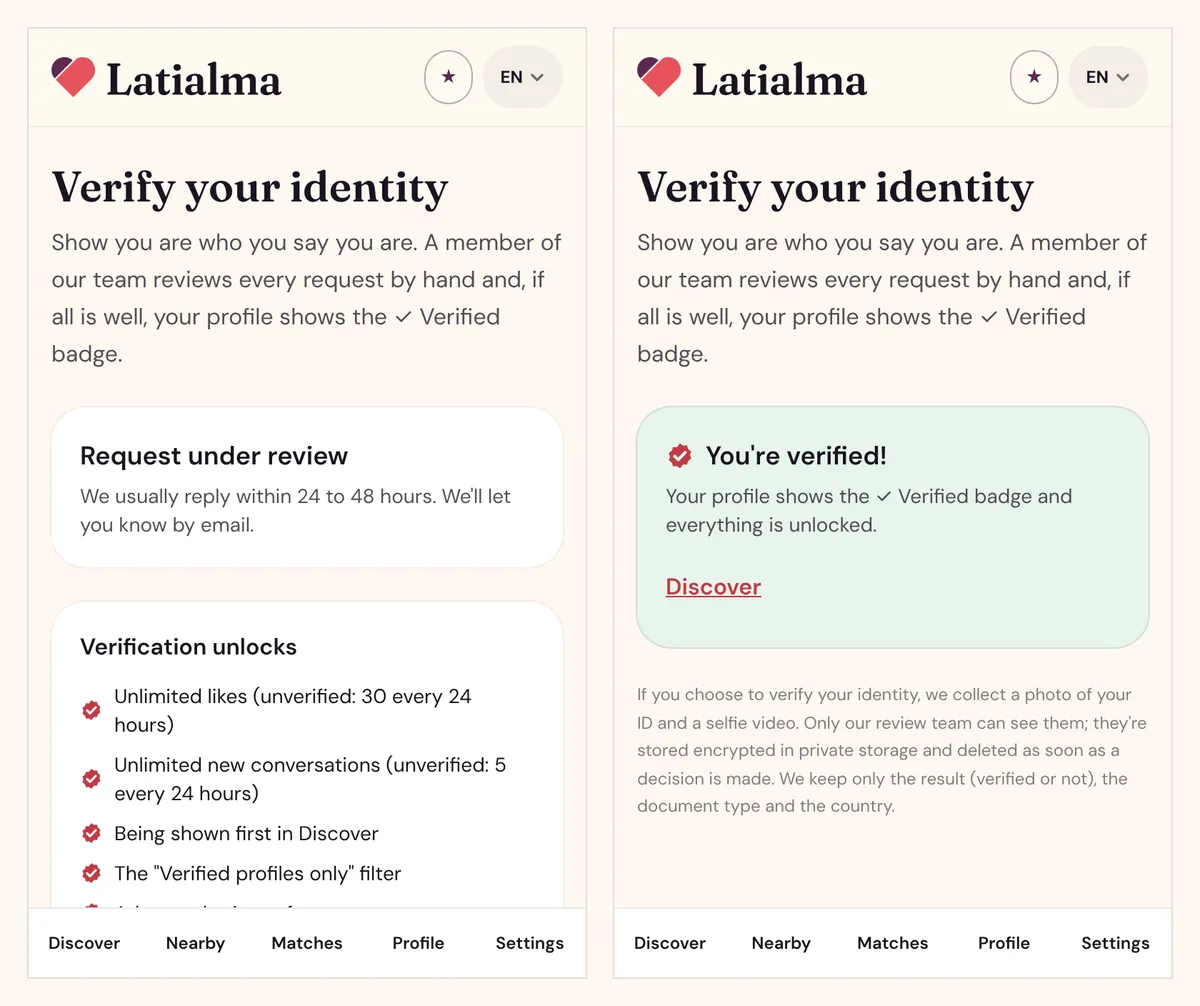
Verification is optional and free. A member of our team checks a photo of your ID and a short selfie video by hand, usually within 24 to 48 hours. Once approved, your profile shows the ✓ Verified badge.
What verification unlocks
| — | Not verified | Verified |
|---|---|---|
| Likes | 30 every 24 hours | Unlimited |
| New conversations | 5 every 24 hours | Unlimited |
| Send photos and videos in chat | No | Yes |
| Place in Discover | Normal | Shown higher |
| "Verified profiles only" filter | No | Yes |
| Choose which places can see your profile | No | Yes |
How to verify
Go to Settings → Identity verification, or tap Get verified on Discover or your profile.
- Your document: choose Passport, National ID card or Driver's licence, and the issuing country.
- Photos of your document: the front (the side with your photo) and, except for passports, the back. Take the photo with your camera or upload a file. All four corners visible, no glare.
- Selfie video of up to 30 seconds: look at the camera, turn your head to each side, hold your ID next to your face and say the 4-digit code shown on screen out loud. The code changes every 24 hours.
- Consent: tick the box and tap Submit for review.
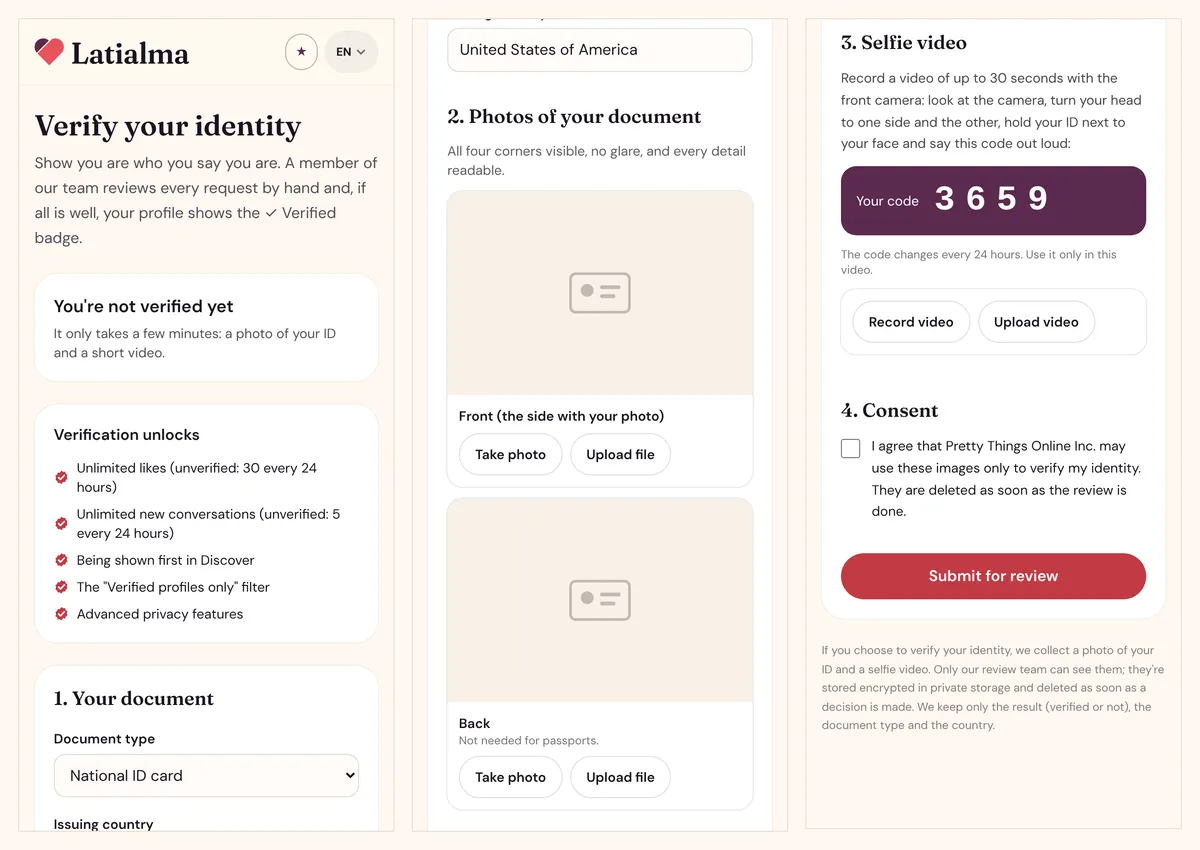
After you submit
Your request shows Request under review, and we email you the result. If approved, you'll see You're verified! If not, the page tells you why (for example an unreadable ID photo, or a code that can't be heard) so you can try again; you can submit up to 3 times in 24 hours.
Your ID photos and video are only seen by our review team, and they're deleted as soon as the review is done.
Privacy and safety
You decide who sees you, and you can block or report anyone you've matched with at any time.
Block or report someone
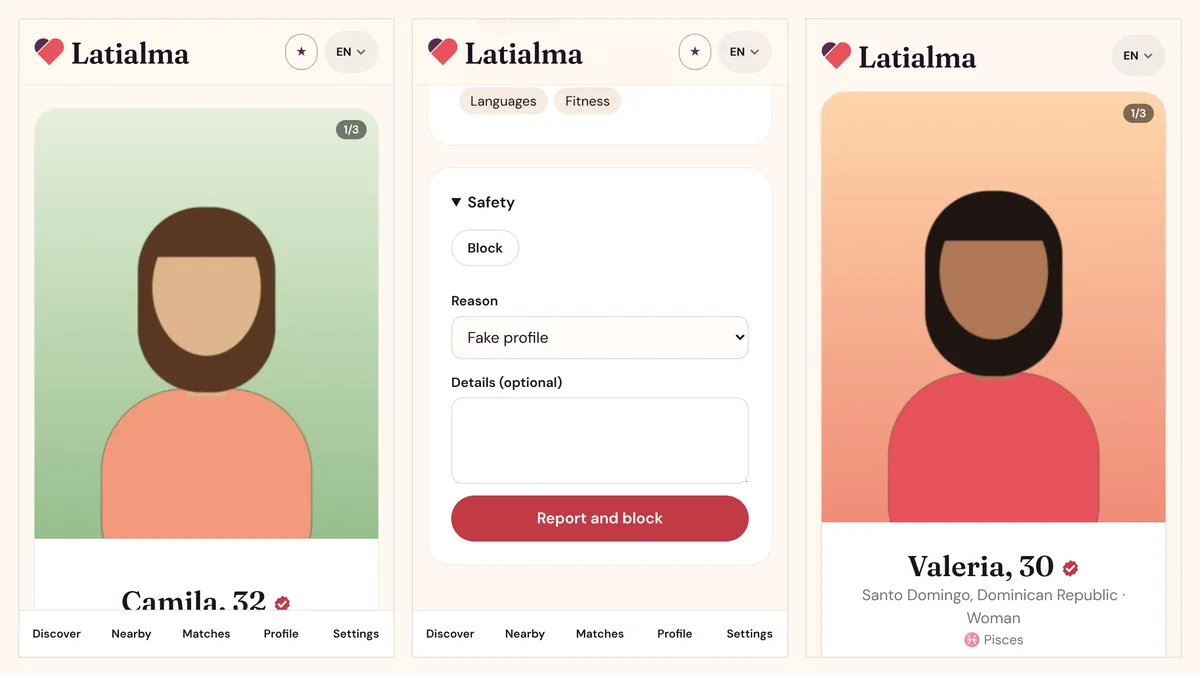
Open the person's profile (from the chat, tap View profile), scroll to the bottom and tap Safety.
- Block: they disappear from your Discover, Nearby, Matches and chats, and you disappear from theirs.
- Report and block: choose a reason (Fake profile, Scam or money, Harassment, Underage, Inappropriate content or Other), add details if you like, and send. We block them for you right away and our team reviews the report.
Who can see you
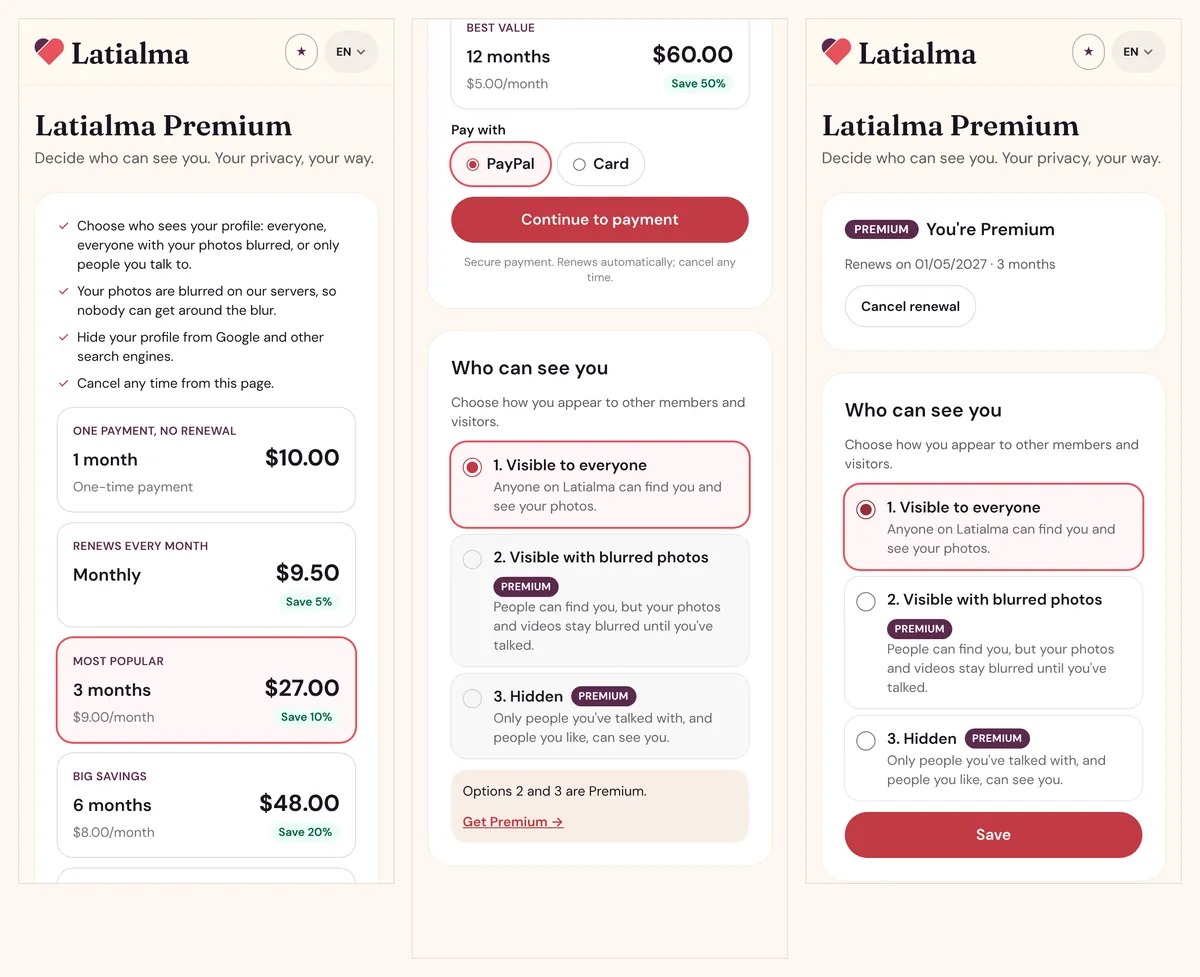
In Settings → Who can see you (or on the Premium page), choose:
- Visible to everyone: anyone on Latialma can find you and see your photos.
- Visible with blurred photos (Premium): people can find you, but your photos and videos stay blurred until you've talked.
- Hidden (Premium): only people you've talked with, and people you like, can see you.
You can also limit your profile to certain countries or cities under Location & distance → Who can see my profile (verified members).
Your public profile and search engines
Your profile has a public page that people without an account can see, and it can appear in Google and other search engines. It shows your name, age, city, photos and the details you chose to fill in, never your email, phone or exact location.
To hide it from search engines, turn off Search engines in Settings. It's free for everyone. Use See my profile as others see it or View my public profile to check what's showing.
Your location
Other members only ever see your city and an approximate distance. If you use your current location, it's rounded to about 1 km.
Premium
Premium gives you more ways to meet people and more control over who sees you; everything else on Latialma (likes, matches and messages) stays free. Open it from the ★ button at the top of the screen.
For now, Premium isn't sold: you get it free by inviting people. When 3 people who joined with your code verify their identity, you have Premium for life (see Invite friends). Nothing is charged on the website or in the app.
What Premium adds
- See who likes you and who viewed you: everyone who liked you or viewed your profile (free accounts see the 4 most recent of each).
- Unlimited filters in Discover and Nearby (free accounts can use up to 3 at a time).
- Travel mode: browse and be seen in another city before you arrive.
- Boost: be shown first in Discover for 30 minutes, once a week.
- Visible with blurred photos and Hidden modes (see Privacy and safety). Photos are blurred on our servers, so nobody can get around the blur.
Using the Premium tools, filters and chat translation
Who likes you. On Discover, tap ♥ … people like you (or open it from your profile). You see everyone who liked you, newest first, with Waiting for you, Match or You passed next to each name. Free accounts see the 4 most recent and how many more there are; Premium shows everyone. Tap someone to see their profile and choose Like or Pass.
Who viewed you. Tap 👁 Visits on Discover or your profile. A visit counts when someone sees your card in Discover or opens your profile; the same person counts again after 30 minutes. Free accounts see the 4 most recent visitors; Premium shows everyone. Members using Hidden mode don't appear unless you've talked or they liked you.
Favorites (free for everyone). Tap ☆ on someone's profile to save them, and ★ to remove them. Find them under ★ Favorites. Only you see this list; nobody is told you saved them.
Chat translation (free for everyone). Nothing to set up: when a match writes in another language, the message shows in your site language with "Automatically translated from …" and See original below it. Turn it off in Settings → Translate my chats automatically. Your own messages are never changed, and the other person always sees exactly what you wrote.
Filters. On Discover, tap ⚙ Filters: only profiles with photos, recently active, new members, languages they speak, and what they're looking for. Choose what you want and tap Apply filters. A free account can use up to 3 filters at a time (each kind counts once, so choosing two languages is one filter); Premium has no limit. The button turns purple and says Filters on while they apply. Tap Clear filters to see everyone again. If Premium ends while you have more than 3 filters on, they pause until you remove some.
Travel mode. On Discover tap ✈ Travel mode (or open it from Settings). Type the city you're going to, pick it from the list, choose how long (3, 7, 14 or 30 days) and tap Turn on travel mode. People there see you with "Traveling to …" on your profile, and distances are measured from that city. It ends by itself, or tap Turn off travel mode.
Boost. On the Premium page, tap ⚡ Boost my profile now. For 30 minutes you're shown first in Discover (right after people who already liked the viewer). You get one boost every 7 days; the page shows when the next one is available.
Where they really are. On profiles in Discover and your matches, Premium shows the city and country the person is really in, how it was checked (🛰️ GPS from their phone, or 🌐 their internet connection) and how far that is from you (miles in the US, km elsewhere). If someone connects from a different country than their profile says, you'll see a warning. It's there to help you spot fake profiles. Nobody's exact position is ever shown.
How to get Premium
- Open the Premium page (★). Under Get Premium free by inviting you see your code, your link and how many of your 3 people have verified.
- Share your link by WhatsApp (or Copy link and send it anywhere). People who open it sign up with your code already filled in.
- Each person counts once they verify their identity. When the third one is verified, the page shows Free Premium for life, and you get a notification.
- Choose your visibility under Who can see you and tap Save.
Already paid for Premium before? You keep it until your end date. To stop renewing, tap Cancel renewal on the Premium page (for purchases made in the app, cancel in your App Store or Google Play subscriptions). When a paid Premium ends, your profile becomes visible to everyone again.
Free Premium with a Latialma card
A code from a Latialma promo card gives you Premium for life: the Premium page shows Free Premium for life and you never pay. If you already had a renewing plan, tap Cancel renewal so you aren't charged again.
Invite friends
Every member has their own invitation code and link. Open them from the Premium page or Settings → Invite friends.
- Your code, link and QR code: share them by WhatsApp, copy the link, or show the QR on your phone.
- Free Premium for life: when 3 people who joined with your code or link verify their identity (ID document and video), Premium unlocks for good.
- The people you invited are listed by first name only, with Not verified yet or Verified ✓. You never see their messages or contact details.
- Only real people who verify count. Duplicate, fake or self-referred accounts don't count. A code has to be entered when the account is created, or within its first 30 days.
Invite & earn (Latialma card holders and promoters)
Members who joined with a Latialma card, and our promoters, earn money instead. Their page is Settings → Invite & earn.
- Your code, link and QR code: share them by WhatsApp or show the QR on your phone. People who sign up with them are credited to you.
- What you earn: $1 for each person who joins and verifies their identity, plus 10% of their first Premium payment.
- Your totals: *Waiting for verification* (they joined but haven't verified yet), *Owed to you* and *Already paid*. Payments are made monthly; your coordinator's name and contact are on the page.
- The people you invite are listed by first name only. You never see their messages, contact details or payments.
- Only real people who verify count. Duplicate, fake or self-referred accounts earn nothing, and refunded payments are cancelled.
Settings and your account
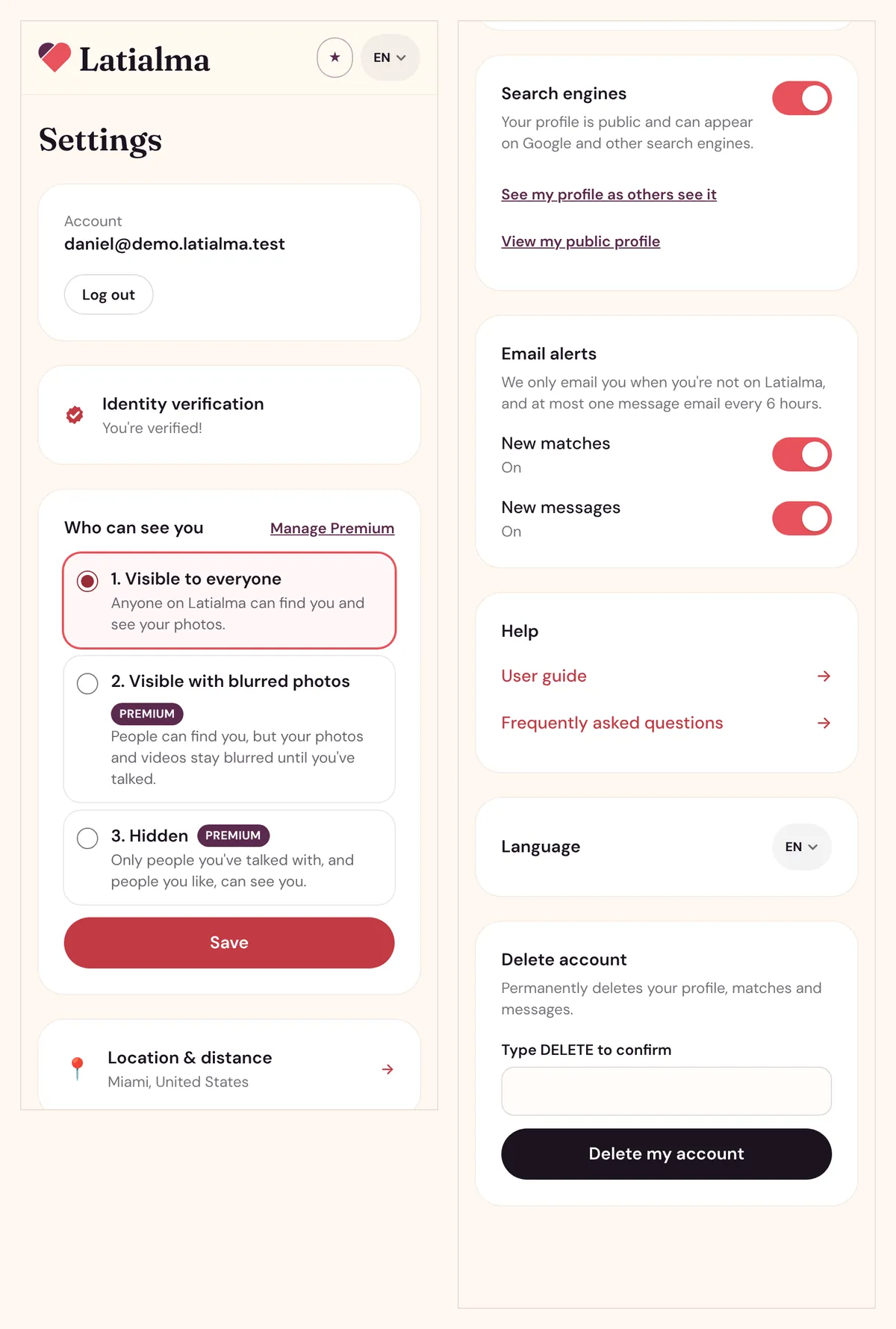
Settings (in the bottom menu) holds everything about your account in one page.
| Setting | What it does |
|---|---|
| Account | Shows the email or phone you log in with, and Log out. |
| Identity verification | Opens verification, or shows that you're verified. |
| Who can see you | Visible to everyone, with blurred photos, or hidden (the last two need Premium). |
| Location & distance | Your location, maximum distance and places. |
| Search engines | Whether your public profile can appear in Google (hiding it is free). |
| Email alerts | Turn New matches and New messages emails on or off. |
| Texts to your phone | For phone accounts: shows the number your verification codes go to (by SMS). |
| Ways to sign in | Shows Google, Facebook or TikTok if your account is connected to them. |
| Invite friends | Your invitation code and link, the people you invited and your progress toward free Premium (card holders: what you've earned). |
| Language | Español, English, Português or Français. |
| Delete account | Permanently deletes your account. |
Turning off alerts from an email
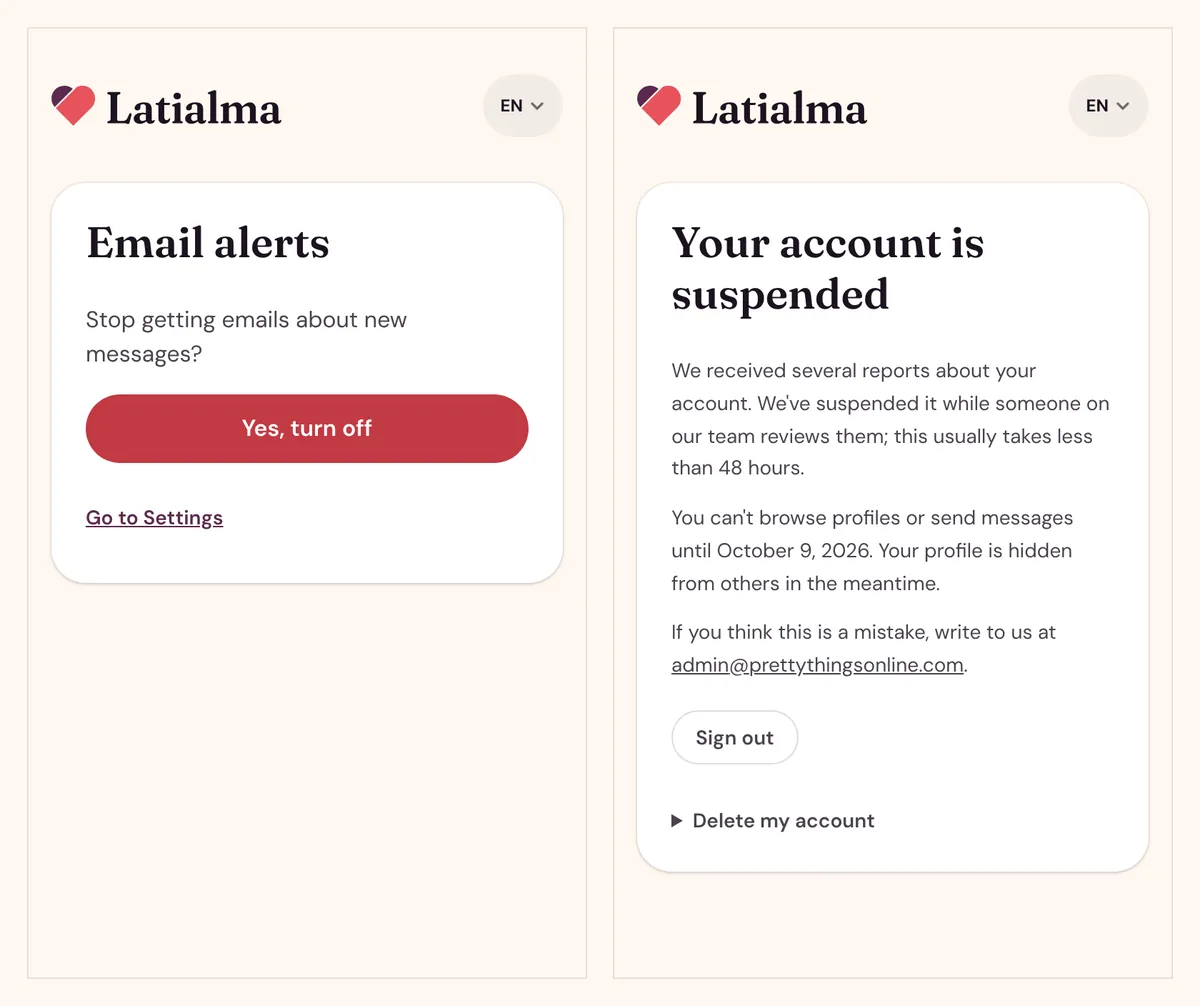
Every alert email has a link at the bottom. Tap it and then Yes, turn off to stop that kind of email; you can turn it back on in Settings.
Deleting your account
In Settings → Delete account, type DELETE and tap Delete my account. This permanently deletes your profile, photos and videos, matches and messages, and can't be undone. If you have a renewing Premium plan, tap Cancel renewal on the Premium page first.
If your account is suspended
If an account breaks our rules, or several members report it, we may suspend it while our team reviews it, usually in less than 48 hours. During a suspension you can't browse or send messages, and your profile is hidden. The page shows the reason, the end date and how to contact us. Accounts that seriously break the rules can be closed permanently.
Still need help? Email us at admin@prettythingsonline.com.